Dreame vacuums for fast and efficient cleaning!

{{ totalProductsCount }}
In cart {{totalProductsCount}} item(s)
In cart {{totalProductsCount}} item(s)
Total:
{{sum | formatAmount}}
Your cart is empty
Markdown Routers
Demo
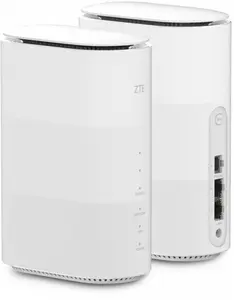
ZTE
Router ZTE MC888B 5G dual-band Wi‑Fi 6, SIM slot, Gigabit Ethernet, 2 LAN ports, 1 WAN, 1000 MB internal memory, black
Delivery: 05.11.2026
122.99 €
Fast delivery available
Demo
Routers are network devices that forward data packets between computer networks and manage traffic to ensure devices can communicate with each other and with the internet. They are used in homes, small offices, and large business environments to connect wired and wireless devices, assign local IP addresses, and provide network services such as firewalling and traffic prioritization. Typical scenarios for choosing a router include providing Wi‑Fi coverage in an apartment, connecting multiple devices in a small office, linking separate network segments in a building, or enabling guest access and parental controls. Routers vary by supported wireless standards, number of Ethernet ports, throughput capacity, and built‑in management features, which determines their suitability for different network sizes and usage patterns. When selected and configured correctly, a router helps optimize network performance, enable secure access, and simplify device communication across local and wide area networks.
Types of Routers
Common router types are grouped by use case and functionality. Each type fits different network requirements and deployment environments.
- Home routers: compact devices combining a wireless access point, switch, and router functions for residential use.
- Wireless routers (Wi‑Fi): provide wireless connectivity using standards such as Wi‑Fi 5 (802.11ac) and Wi‑Fi 6/6E (802.11ax).
- Wired routers: emphasize Ethernet connections and higher port density for stable wired networks.
- Mesh routers: multiple units that work together to extend consistent wireless coverage across larger areas.
- Business and enterprise routers: offer advanced routing, VPN support, higher throughput, and centralized management for corporate networks.
- Mobile and LTE/5G routers: use cellular networks to provide internet access where wired connections are unavailable or as backup links.
What are Routers used for?
Routers perform core network functions that enable communication and manage traffic between devices and networks.
- Routing traffic between local devices and the internet, translating and forwarding IP packets.
- Providing Wi‑Fi access and managing wireless connections for smartphones, laptops, and smart devices.
- Assigning local IP addresses through DHCP and resolving local names via basic DNS services.
- Securing networks with built‑in firewalls, access controls, and guest network segmentation.
- Supporting VPN connections for secure remote access and site‑to‑site links between networks.
- Prioritizing traffic with Quality of Service (QoS) for applications like voice, video, and gaming.
Key Differences between Routers
Routers differ in hardware capabilities, supported standards, and software features that affect performance and management.
- Wireless standard and speed: models support different Wi‑Fi generations (e.g., Wi‑Fi 5 vs Wi‑Fi 6/6E) that determine theoretical throughput and capacity.
- Port count and type: number and speed of Ethernet ports (e.g., gigabit, multi‑gig) affect wired connectivity options.
- Processor and memory: more powerful hardware supports higher throughput, more simultaneous connections, and advanced features.
- Coverage and antenna design: external or internal antennas and mesh capability influence wireless range and stability.
- Security and software: presence of firewall, automatic updates, parental controls, and VPN features varies by model.
- Management interface: models differ by web UI, mobile app, or centralized cloud management for multi‑site deployments.
How to Choose Routers?
Select a router based on network size, device types, required features, and expected internet speed to match performance needs.
- Assess coverage needs: choose a single router for small spaces, mesh systems for larger or multi‑floor homes, and enterprise routers for complex sites.
- Match wireless standard to devices: choose Wi‑Fi 6/6E for newer high‑performance devices, or Wi‑Fi 5 for basic use to reduce cost.
- Consider port and throughput requirements: check ethernet port speeds, WAN compatibility, and the router’s maximum throughput relative to your ISP plan.
- Check security and management features: look for firewall capabilities, regular firmware updates, guest networks, and easy configuration tools.
- Plan for growth and special use: prioritize models with VPN, QoS, and support for many concurrent connections if you have multiple users or IoT devices.
- Evaluate power source and placement: ensure suitable placement for antenna coverage and consider PoE or redundant power for critical installations.
Which markdown routers are the most popular and affordable in 2026?
The full list of popular models at affordable prices is available on this page. In 2026, the following models show high demand and an excellent price-to-quality ratio:
- TELTONIKA Industrial Router RUT145 for 69.99€
- TP-Link Sector Bridge 5 Omada Indoor/Outdoor Bridge for 187.99€
- Business PoE Router D-Link DBR-600-P/B — 2.5GbE, IEEE 802.3at PoE, USB 2.0/3.2 Gen1, IPSec, SPI Firewall, 54V DC 2.7A for 267.99€
Why is it worth buying markdown routers at AiO.lv?
At the AiO.lv online store, you can place an order at a great price with delivery across Latvia — to Riga, Daugavpils, Liepaja, Jurmala, Ventspils, and other cities, as well as throughout Europe. We offer products from leading manufacturers: Acer, ASROCK, Cisco, D-Link, Netgear, PLANET, Siemens, TRENDNET, Zyxel, Asus, TP-LINK, HUAWEI, TENDA, QNAP, UBIQUITI, ZTE, MikroTik, MOXA, TOTOLINK, TELTONIKA. When you shop with us, you get:
- official warranty and guaranteed quality;
- convenient payment options (including installment and credit);
- fast and reliable delivery across Latvia and to any EU country.
FAQ
Where can you find a markdown routers with cheap prices?
You can buy cheaper at the AiO.lv online store. We offer competitive prices and regular discounts, so you always have the chance to find a great deal.
What is the delivery time for markdown routers?
If you place your order today, delivery will take between 1 and 5 business days depending on the chosen method.
How long is the warranty period for markdown routers?
Our store provides an official manufacturer’s warranty ranging from 12 to 36 months, depending on the model and brand. If needed, you can always contact our customer service department or the manufacturer’s authorized service center for support.
Are markdown routers purchasable with leasing?
Yes, if the selected product costs more than €50. You can learn more about installment purchase options and the terms of application on the Payment page.
Can markdown routers be purchased for a company (with VAT)?
Yes. AiO.lv works with legal entities in Latvia and throughout Europe. All product prices are shown with VAT included. In certain cases, a 0% VAT rate may apply — for example, when purchasing from other EU countries with a valid VAT number. We issue an invoice immediately after the order is placed, support BIS electronic invoices, and automatically generate all required accounting documents. To complete a purchase for a company, simply select the company profile during checkout.


